Lessons from optimizing Celery Task execution with KEDA and Redis
Lessons from optimizing Celery Task execution with KEDA and Redis
tl;dr
Figuring out which scaling triggers and Celery orchestration settings to use and how to configure them requires some thought and knowledge of your tasks and business domain (surprise!).
Description
I recently had to migrate an existing codebase that had a nicely working auto-scaling setup using KEDA on Kubernetes, where Celery was used to create and process tasks, with Azure Cache for Redis acting as the broker. Basically, we had a task producer pod, that sent task to a queue (Redis) and then KEDA scaled separate worker pods to process tasks in the queue.
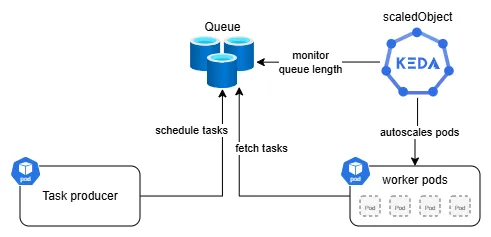
While migrating I decided that I also wanted to optimize the scaling and task processing as I saw several issues. I'll outline how I fixed those below.
Large tasks
First, I found out that roughly 4% of all tasks took significantly longer to process than all others (4-5h vs. 10-20s), the existing setup already accounted for that by having high- and low-memory worker pods to process "larger" and "smaller" tasks. In fact the processing of large tasks took so long, that the 2h visibility_timeout of tasks was exceeded. This lead to the large tasks being processed multiple times, as they got moved back to the queue after the timeout, while the initial processing was still running. So we were wasting computer resources and also bloating the downstream systems.
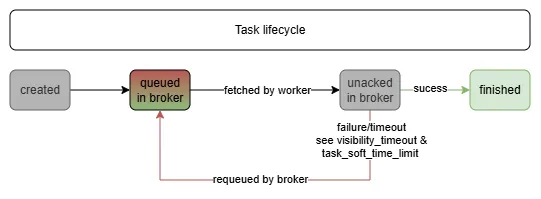
Problem: Wasting resources by processing the same task several times with several workers (luckily the tasks are idempotent).
Solution: I updated the celery config:
MyCeleryApp.conf.update(
...
task_acks_late=True,  # late acknowledgments to prevent task duplication
task_acks_on_failure_or_timeout=False,  # requeue tasks that fail or time out
task_soft_time_limit=18000,  # 5 hours, throws exception in task
task_time_limit=21600,  # 6 hours, kills task
broker_transport_options={"visibility_timeout": 18000},  # specific to Redis, after 5h send task back to queue
...
)
This achieves that worker pods actually only acknowledge (mark as done) tasks after they have been successfully processed by the worker and that worker pods have more time to process the large tasks (they stay in the unacked queue for 5h instead of 2h).
Impact: This change ensured large tasks being processed only once and thereby saved considerable resources.
Scaling long-running pods in k8s
Next I found out that the scaling of the large and small worker pods was (understandably) tied to the queue lengths in the Redis (used as the task broker). All the worker pods are deployed via k8s deployments and had a termination grace period of 300s. The scaling triggers were configured with a cooldown of 300s as well. The small worker pods were scaled based on the queue length of their own queue in Redis and the large worker pods were scaled base on their own queue and the length of the unacked queue in Redis. After some pondering I realized why this was the case!
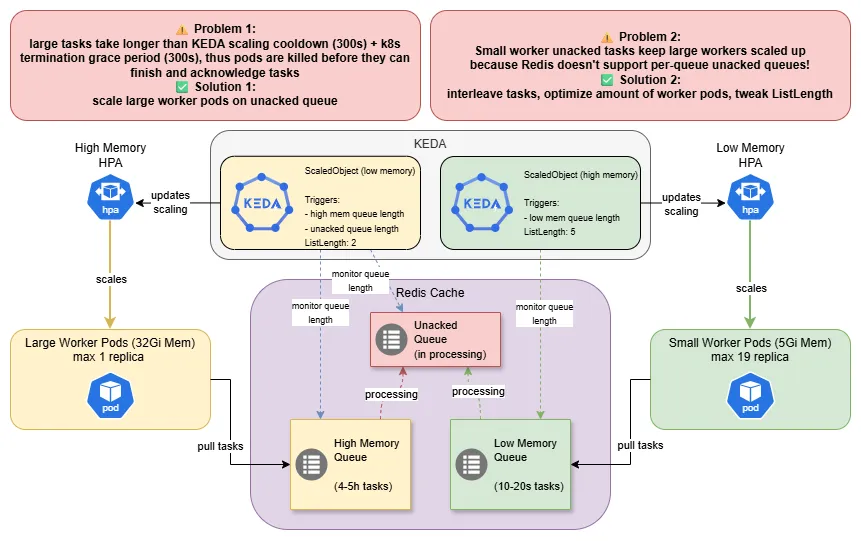
Problem 1:
- KEDA will scale the pods (via the
HorizontalPodAutoscaler(HPA)) down after 300s (cooldown period), so once all (large) tasks are in processing (i.e. high memory queue is empty) tasks have 300s (cooldown period) + 300s (termination grace period) to finish - then they areSIGKILL'ed- this is fine for small tasks taking 10-20s on average
- this is problematic for large tasks taking 4-5h - pods need to be "protected" from the scaledown
Solution
We let KEDA scale the large worker pods based on two triggers! The large task queue and the unacked queue, thereby as long as a large task is still processing, the large pods wont be scaled down.
sidenote: Instead of the
unackedqueue trigger for the large pods, you could of course also set a much longerTerminationGracePeriod, but your cluster admin will probably be quite unhappy!
Problem 2:
- Redis only supports a shared
unackedqueue for all queues - Even if only small tasks are queued, the large worker pods remain scaled up, as KEDA needs to scaled based on the
unackedqueue (see problem 1) - The large worker pods are resource intensive (say 32Gi of RAM) and underutilized/not utilized, this will make your cluster admin unhappy.
Solution In a fully ideal world, you wouldn't use Celery together with Redis in Production and avoid these shenanigans altogether. In a less ideal world, you would just set up a separate DB in Redis or a separate Redis instance for your larger tasks. But few of us get to live in the fluffy ideal world. The solution I picked to solve this, is not straightforward and heavily dependent on understanding of the nature of the tasks and how they arrive in the queue.
- I was able to interleave large and small tasks during queuing, this means that large and small task queues are drained at similar rates so we don't keep large worker pods running unduly
- I decreased the max replica number of large worker pods and increased the max replicas for small worker pods - this still allowed the large task queue to be processed fast enough, while also processing the small tasks much faster
- I changed the
listLengthparameter of the KEDA Redis trigger, this controls how many tasks (on average) should be in the queue per worker and making this dependent on the queue/worker type allows me to scale large pods more conservatively
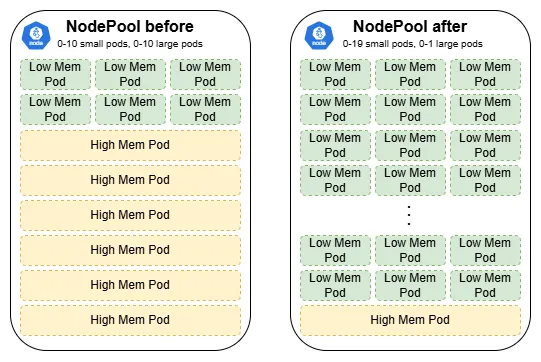
Impact: Before these fixes I had 10 large worker pods and 10 small worker pods at max replicas. Knowing about the ratio between large and small tasks (roughly 4% large vs 96% small), and how they are processed, I was able to achieve much higher queue throughput (at lower k8s resource consumption!) by using 1 large worker and 19 small worker pods.
WRONGPASS red herring
Initially, the KEDA scaledObjects kept reporting WRONGPASS errors when I set up the authenticated Redis triggers using a k8s secret. This prevented the HPAs to be created, which already took me some time to figure out. And then it turned out that the issue was actually not a wrong key (I checked multiple times), but that I overlooked that the secret I was using, was not a stringData type secret, but a data type secret. Oh well, sometimes you just don't see the forest for all the trees.
What can you learn from this?
Use separate queues for large/small tasks if:
- Task duration varies significantly: >10x (my case: 1000x difference)
- Resource requirements differ significantly (memory, IO, GPU necessary, ...)
Carefully analyze distribution of your tasks:
- How many small vs large tasks do you have
- How much longer does a large task take
- Consider how you schedule tasks to optimize scaling
When the unacked queue scaling pattern makes sense:
- Need to use Redis as broker (no per-queue
unackedsupport) - Task duration >> reasonable termination grace period
- Cannot use separate Redis instances/DBs
Interesting settings in Celery to consider:
task_acks_late- Celery Docstask_acks_on_failure_or_timeout- Celery Docstask_soft_time_limit- Celery Docsbroker_transport_options- whatever your broker (here Redis) allows you to configure
Interesting settings in KEDA to consider:
listLength- KEDA Redis Trigger DocsactivationListLength- KEDA Redis Trigger Docs
Alternative approaches if your constraints differ:
- Other broker: e.g. RabbitMQ - Supports per-queue unacked
- Longer TerminationGracePeriod: If cluster (admin) allows it
- Task chunking: Break 5h tasks into smaller units (not possible for me)
Summary
I learned that using Celery and Redis together in Production is not the best combination, people have noted that Celery's documentation is not easy to read and to piece together and that Celery is somewhat of a fickle friend when it comes to stability. The former I can confirm, the latter I'm cautiously optimistic about, I haven't had issues yet.
I've also learned that scaling in k8s is extremely powerful, but that in order to not waste resources, you need to carefully tune your scaling. Having an understanding of your business domain is paramount! This requires you to fully grasp your task lifecycle, from creation, to scheduling, processing and acknowledgment.
Resources: